Native macOS · Free forever · MIT

Curl your files
into armor.

PangoLock hides and AES‑256 encrypts any folder on your Mac behind a master password that is never stored. Like a pangolin rolling into an armored ball.

Build from source
  • AES‑256‑GCM
  • PBKDF2 · 210k
  • Touch ID
  • App Sandbox
  • No logging calls
PangoLock

One click to hide. One more to encrypt. Your folder disappears from Finder and every other app.

Two levels of armor

Hide when it's private. Lock when it's secret.

Hidden

Hide

Removes the item from Finder, strips all POSIX permissions (chmod 000) and drops a Spotlight skip marker, so video players, media scanners and search can't reach it. Show restores everything.

Strong against ordinary apps. Not encryption.

Encrypted

Lock

Archives the folder, encrypts it with AES‑256‑GCM into a managed .plock blob, decrypts and verifies the result, and only then removes the plaintext. Nothing can find or read it until you unlock.

The real defense. Use it for anything sensitive.

Every feature, no paywall

A whole vault, in one small native app.

🔒

Lock & encrypt

Unlimited folders with AES‑256‑GCM and an optional per‑folder password.

🙈

Hide & show

Gone from Finder, permissions stripped, skipped by Spotlight. One click brings it back.

🔑

Zero‑knowledge

Master password never stored (PBKDF2, 210k rounds), Touch ID unlock, idle auto‑lock.

🧯

Fail‑safe

Verify‑before‑delete, atomic writes and journaled moves. An interrupted operation never loses data.

🛟

Recovery & backups

Recovery key for a forgotten password, encrypted backups, and export‑everything so data is never stranded.

💳

Encrypted wallet

Logins, cards, notes and licenses, with a strong‑password generator built in.

💾

Portable & shareable

USB lockers (.pangolocker) and encrypted sharing (.pangoshare) with a password hint.

🕵️

Intruder & stealth

Opt‑in intruder snapshot after failed unlocks, Dock‑hiding stealth mode, and a panic lock‑and‑hide.

🧹

Shredder & cleaner

Multi‑pass secure shredder, trace cleaner, and warnings for iCloud, Dropbox, Drive and OneDrive paths.

Security is the product

From password to ciphertext, step by step.

  1. 01

    Your password

    Typed, used, wiped from memory with memset_s. Never written anywhere.

  2. 02

    PBKDF2‑HMAC‑SHA256

    210,000 iterations over a random 16‑byte salt derive the master key.

  3. 03

    HKDF per item

    Each folder gets its own independent key, or one from its own folder password.

  4. 04

    AES‑256‑GCM

    nonce ‖ ciphertext ‖ tag, fresh nonce every time. Tampering fails to open.

  5. 05

    Verify, then delete

    The blob is decrypted and checked before the plaintext is ever removed.

0bit AES keys
0PBKDF2 iterations
0unit tests on the core
0logging calls that could leak

Honest positioning: PangoLock protects your data at rest on your Mac. It is not a defense against a fully compromised or root‑owned machine. The full threat model, including what it does not defend against, lives in SECURITY.md.

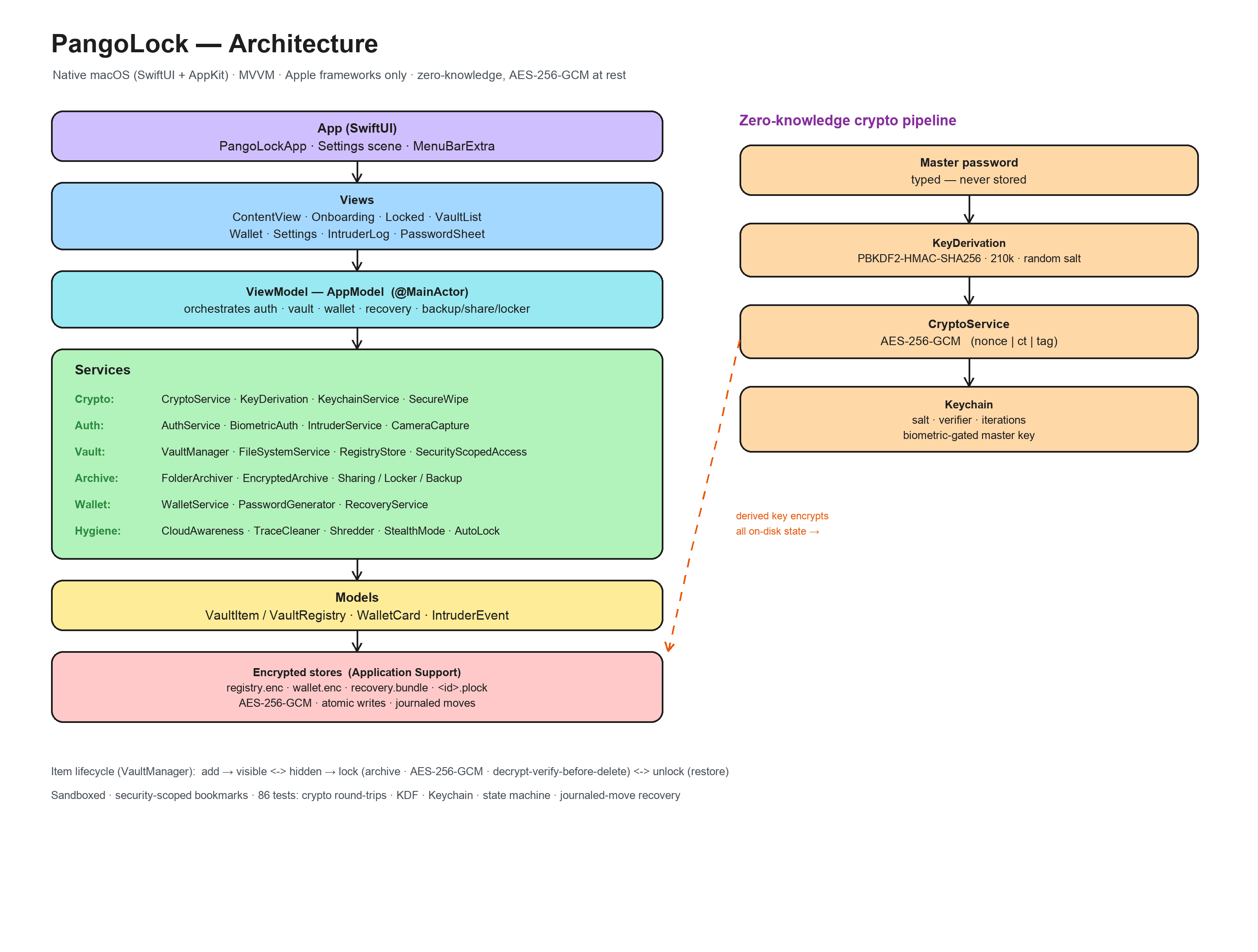
Apple‑native, end to end

SwiftUI on top. CryptoKit underneath.

MVVM with CryptoKit, LocalAuthentication, the Keychain, AVFoundation and AppKit. No third‑party dependencies.

AppPangoLockApp · Settings · MenuBarExtra
ViewsOnboarding · Locked · VaultList · Wallet · IntruderLog
ViewModelAppModel orchestrates auth, vault, wallet, recovery
ServicesCrypto · KeyDerivation · Keychain · VaultManager · Shredder · 20+
Encrypted storesregistry.enc · wallet.enc · recovery.bundle · *.plock
PangoLock architecture diagram
Full write‑up in docs/ARCHITECTURE.md.

Requirements: macOS 13+ · Xcode 16+ · Swift 5.9+

Build it yourself in a minute.

Universal binary for Apple Silicon and Intel.

zsh
git clone https://github.com/suriya4code/PangoLock.git
cd PangoLock
xcodebuild build -project PangoLock.xcodeproj -scheme PangoLock \
  -configuration Debug -destination 'platform=macOS' \
  CODE_SIGNING_ALLOWED=NO -derivedDataPath build
open build/Build/Products/Debug/PangoLock.app
run the tests
xcodebuild test -project PangoLock.xcodeproj -scheme PangoLock \
  -destination 'platform=macOS' CODE_SIGNING_ALLOWED=NO -derivedDataPath build

Signing, notarization and release DMGs: docs/RELEASING.md.

PangoLock pangolin shield emblem

Free forever. Really.

No premium tier, no account, no paywall. If PangoLock protects something you care about, a star or a sponsorship keeps it going.